For Enterprise CTOs in 2026, the obsession with raw TFLOPS is a dangerous distraction from the actual bottleneck of generative AI: physical infrastructure. As we scale into the Blackwell era, the real battle for TCO is won or lost in the "rack plumbing"—the delicate interplay between high-density NVMe storage, 200GbE (and increasingly 400GbE) networking, and the transition to liquid cooling. If your I/O components are thermal throttling, your $40,000 GPUs are effectively expensive paperweights.
Heads up: AI Hardware Hub may earn a commission when you buy through links on this page. We only recommend gear we'd run ourselves.

§The Blackwell TCO trap: Why benchmarks lie
The marketed performance of a Blackwell-based cluster assumes optimal conditions. However, in a standard air-cooled rack, the heat density produced by a 32-node cluster can exceed 100kW. When the ambient temperature inside the chassis rises, it isn't just the GPUs that suffer. The NVMe controllers and 200GbE network interface cards (NICs) are often the first to throttle.
When a NIC throttles due to heat, packet loss increases. In distributed training, this causes "stall cycles" where every GPU in the cluster sits idle, waiting for data that hasn't arrived. You aren't just losing 10% of your performance; you’re losing the ROI on your entire capital expenditure. Optimizing Blackwell Rack TCO optimization requires a "Cooling First" mentality.
§The I/O bottleneck: NVMe and 200GbE thermal limits
High-density storage is the lifeblood of LLM training. We are seeing deployments using 8TB to 16TB Gen5 NVMe drives in RAID configurations to feed Blackwell's massive VRAM pools. However, Gen5 NVMe drives are notorious for high operating temperatures.
- 200GbE NICs: These components draw significant power and sit in the path of exhausted GPU air.
- NVMe Stalls: When a drive hits 70°C, it drops to Gen3 speeds, creating a data-starvation event for the GPU.
- Packet Jitter: Overheated networking gear leads to inconsistent latency, which is the death knell for benchmarks and scaling efficiency.
§Liquid cooling: No longer optional for Enterprise
In 2026, air cooling a Blackwell rack is akin to cooling a furnace with a handheld fan. We are seeing a massive shift toward Direct-to-Chip (D2C) liquid cooling. By removing heat directly from the GPU, CPU, and increasingly the high-speed networking silicons, you can maintain a consistent T_junction temperature, ensuring 100% uptime at peak clock speeds.
Systems like the Adamant Custom 12-Core Liquid Cooled AI Workstation demonstrate this at the workstation level, but the principle scales to the data center. For larger enterprise deployments, the ASUS Dual AMD EPYC 9004 Series 4U GPU Server is often retooled with liquid manifolds to support the massive TDP of the latest accelerators.
§Comparing thermal management impact on TCO
| Feature | Air-Cooled (Legacy) | Liquid-Cooled (Blackwell Standard) | Impact on ROI |
|---|---|---|---|
| GPU Clock Stability | Variable (Thermal Throttling) | Constant (Peak Boost) | +15-20% Throughput |
| PUE (Power Usage Effectiveness) | 1.5 - 1.8 | 1.1 - 1.2 | ~30% Reduction in OpEx |
| Component Lifespan | Reduced due to heat cycles | Extended (Stable Temps) | Lower Replacement Costs |
| Rack Density | 15-20kW Max | 100kW+ | 5x Savings on Floor Space |
§High-Density storage and GPU synergy
To maximize the 96GB of VRAM found in cards like the PNY Technology VCNRTXPRO6000BQ-PB, the local storage must be able to keep up with the checkpointing requirements. Large-scale models require frequent "state saves" to NVMe. If your storage is slow, your cluster remains locked in an I/O wait state.
For development environments, the BoxGPT AI Workstation balances this by pairing 96GB of Blackwell VRAM with 256GB of DDR5. In a rack environment, this needs to be mirrored with redundant NVMe arrays that are specifically shielded from the heat produced by the high-airflow GPU fans.
§Designing for 200GbE and beyond
Networking is the "invisible" cost of Blackwell Rack TCO optimization. Moving to 200GbE or 400GbE requires specialized optical transceivers. These transceivers are extremely sensitive to heat. In many air-cooled racks, the "hot isle" temperature can actually exceed the operating spec of the optics, leading to intermittent link failures.
Modern AI Workstations like the NOVATECH Apex WS9985X use advanced airflow patterns to separate the I/O zones from the GPU zones. When planning a rack, your "ROI" isn't found in the cheapest GPU, but in the most robust cooling and networking backplane that ensures those GPUs never turn themselves down.
§Bottom line: The verdict on Blackwell infrastructure
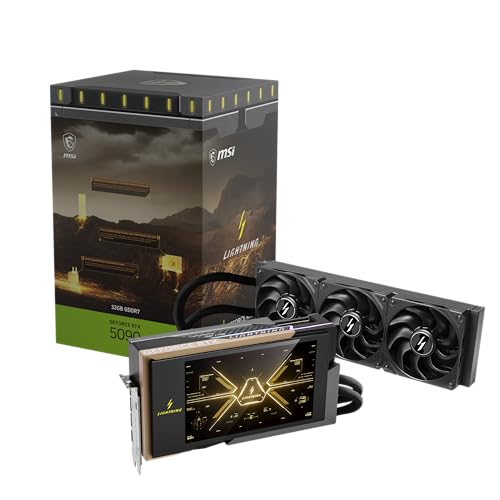
If you are building an AI cluster in 2026, stop looking at GPU price-to-performance in a vacuum. A GIGABYTE AORUS GeForce RTX 5090 Stealth ICE 32G or a pro-series RTX 5090 can only deliver if the "plumbing" supports it.
Invest in liquid cooling, high-density NVMe with dedicated heatsinks, and 200GbE networking with active cooling for the transceivers. The real "optimization" is ensuring your hardware actually runs at the speeds you paid for.
FAQ
Why is liquid cooling necessary for Blackwell racks?
Because the power density of Blackwell-based AI GPUs has reached a point where traditional air-cooling cannot move enough heat out of the chassis fast enough. This leads to thermal throttling not just of the GPUs, but of neighboring components like NVMe drives and NICs.
How does networking affect AI TCO?
In distributed training, if one node's network interface slows down due to heat, the entire cluster must wait for it. This "jitter" lowers the overall utilization of your billion-dollar cluster, significantly increasing the cost per trained parameter.
Can I run Blackwell GPUs in older air-cooled racks?
Technically yes, but you will likely face significant performance penalties. You'll need to reduce the rack density (leaving empty spaces between units), which increases your data center floor space costs and negates the benefits of the high-density Blackwell architecture.
Heads up: AI Hardware Hub may earn a commission when you buy through links on this page. We only recommend gear we'd run ourselves.