The release of DeepSeek-V3 and the impending arrival of Llama-4 have shifted the goalposts for local LLM deployment. Building a "Developer-to-Device" strategy is no longer just about buying the biggest card; it’s a technical choice between leveraging aggressive quantization on consumer GDDR7 hardware or investing in the massive VRAM overhead of enterprise HBM3e systems.
If you want to run these frontier models on your desk, you face a hard limit: DeepSeek-V3’s massive parameter count requires either a multi-GPU consumer cluster or a single, high-capacity workstation card.
Heads up: AI Hardware Hub may earn a commission when you buy through links on this page. We only recommend gear we'd run ourselves.
§The VRAM math for DeepSeek-V3 and Llama-4
Running DeepSeek-V3 locally is a logistical challenge. With its Mixture-of-Experts (MoE) architecture, the model's total footprint is massive, even if only a fraction of parameters are active during inference. At FP16, you’re looking at over 1.2TB of VRAM—completely inaccessible for local hardware.
The strategy for 2026 centers on quantization. By compressing the model to 4-bit (QUIP# or GGUF), the VRAM requirement drops significantly, but you still need roughly 350GB to 400GB of VRAM to keep the full context window usable. For Llama-4 (leaked to have a 400B+ flagship variant), the requirements are similarly steep.

§Quantization vs. native: The GDDR7 advantage
The arrival of GDDR7 on cards like the ASUS ROG Astral NVIDIA GeForce RTX 5090 32GB GDDR7 OC Edition Gaming Graphics Card has changed the math for quantization. In previous years, heavily quantized models suffered from a "bottleneck double-whammy": lower precision reduced accuracy, and slow memory bandwidth killed generation speed.
GDDR7 offers a massive throughput increase. When running a 4-bit quantized version of DeepSeek-V3, the high bandwidth of a 5090-series card compensates for the overhead of dequantization kernels. This allows for nearly 20-30 tokens per second on a flagship consumer card—speeds that were previously reserved for unquantized models on enterprise gear.
However, quantization isn't magic. It degrades the "reasoning" capabilities of the model. For production-grade RAG (Retrieval-Augmented Generation) or complex coding tasks, ML engineers are increasingly opting for "Native Inference" on high-VRAM professional cards.
§Scaling your VRAM: The three tiers of local LLM builds
To decide on your strategy, you need to look at your specific use case. Are you prototyping or are you deploying a local inference server for a small team?
- The Prototyper: A single ASUS ROG Astral NVIDIA GeForce RTX 5090 32GB GDDR7 OC Edition Gaming Graphics Card. This is enough for Llama-3 70B at 8-bit or DeepSeek-V3 small distillates.
- The ML Engineer: A dual-GPU setup or a dedicated workstation like the Adamant Custom 12-Core Liquid Cooled Editing Modelling AI Learning Workstation Computer PC AMD Ryzen 9 9900X3D 4.4GHz X870 TUF 192GB DDR5 8TB NVMe GEN4 SSD 10TB HDD 1200W Geforce RTX 5090 32GB. This provides 64GB of VRAM and enough system RAM to offload larger layers.
- The Enterprise Developer: Solutions like the BoxGPT AI Workstation, RTX PRO 6000 Blackwell, 96GB VRAM, Ryzen 9900X, 256GB DDR5, 2TB NVMe. With 96GB of high-speed VRAM, you can run larger model slices with much higher fidelity.
| Feature | Consumer Elite (RTX 5090) | Professional (RTX 6000 Ada) | Enterprise Workstation (Blackwell Pro) |
|---|---|---|---|
| VRAM Capacity | 32GB GDDR7 | 48GB GDDR6 | 96GB (Max-Q/Blackwell) |
| Ideal Quantization | 4-bit to 6-bit | 8-bit | Native / Low-Quant |
| DeepSeek-V3 Capability | Distilled versions only | Full MoE (Heavily Quantized) | Full MoE (Compressed) |
| Memory Bandwidth | Very High (GDDR7) | High (GDDR6) | Extreme (Blackwell Arch) |
| ECC Support | No | Yes | Yes |
§Why VRAM expansion beats quantization for "Production-Local"
If you’re using DeepSeek-V3 for sensitive data where accuracy is non-negotiable, you want to avoid 4-bit quantization. This is where VRAM expansion becomes the primary strategy.
Using a card like the PNY NVIDIA RTX 6000 ADA offers 48GB of VRAM with ECC (Error Correction Code) memory. When you step up to the PNY Technology VCNRTXPRO6000BQ-PB NVIDIA RTX PRO 6000 Blackwell Max-Q Workstation Graphics Card, you get a staggering 96GB of VRAM. This allows you to run Llama-4 or DeepSeek-V3 with significantly higher precision, ensuring the model doesn't "hallucinate" due to lossy compression.

For teams that need maximum uptime, looking at /categories/ai-workstations is essential. A pre-built system like the BoxGPT AI Workstation - RTX PRO 6000 Blackwell, Ryzen 9900X, 128GB RAM, 2TB NVMe removes the headache of driver conflicts and thermal throttling that often plague custom multi-GPU builds.
§Going beyond the workstation: Enterprise server strategy
When even 96GB isn't enough, we enter the world of HBM (High Bandwidth Memory). For organizations fine-tuning DeepSeek-V3 or running massive batch inference, the "Developer-to-Device" path leads to the data center.
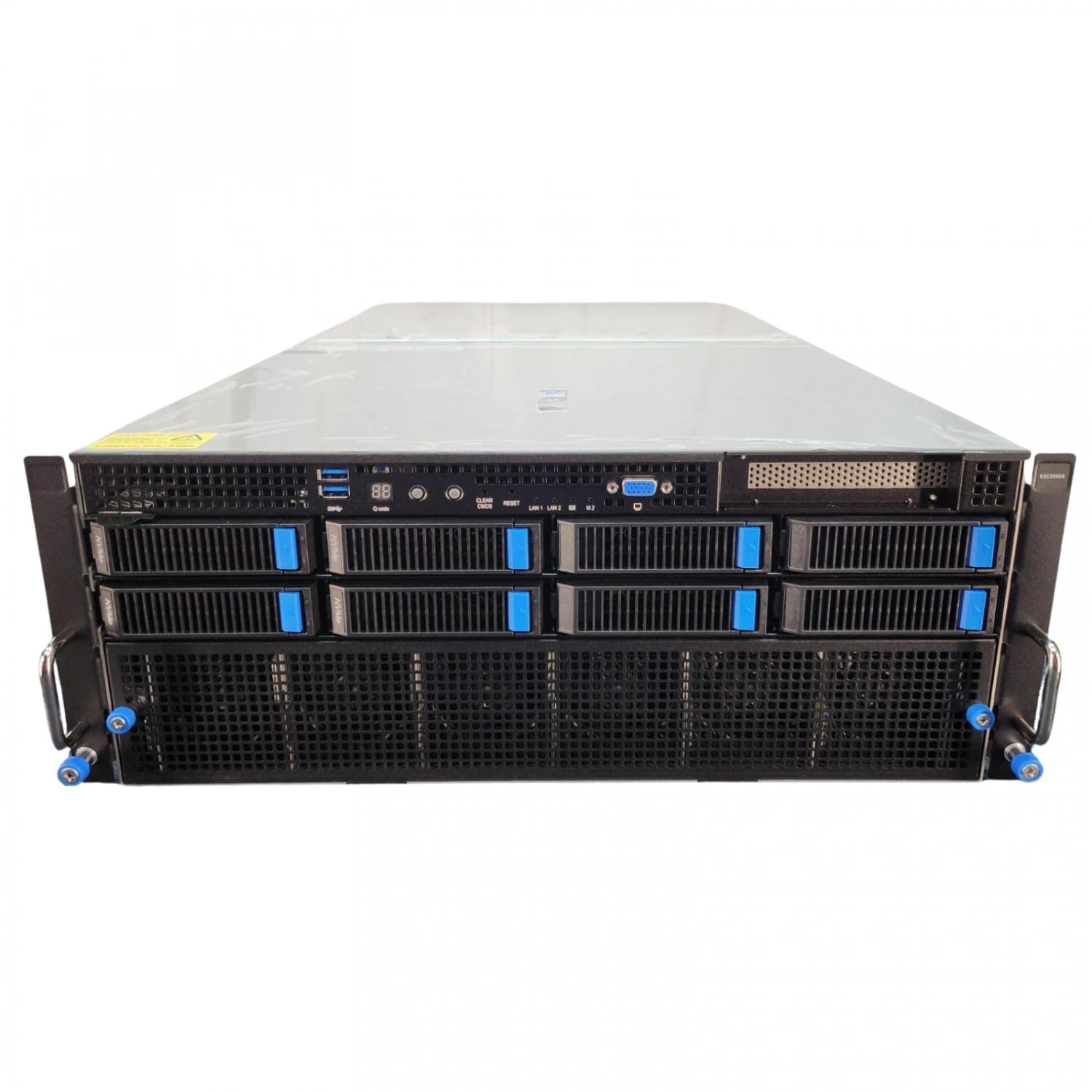
Systems like the ASUS Dual AMD EPYC 9004 Series 4U GPU Server (ESC8000A-E12P) with 2x NVIDIA H200 NVL 141GB GPUs represent the pinnacle of current hardware. With 141GB of HBM3e per GPU, you finally have the headroom to run frontier models at near-native precision with massive context windows. You can check our latest /benchmarks to see how HBM3e handles MoE shuffling compared to traditional GDDR systems.
§Local Hardware Checklist
If you're upgrading in 2026, here’s what you need to prioritize:
- Check the Bus: Ensure your motherboard supports PCIe 5.0 to handle the data transfer between the CPU and your new NVIDIA RTX PRO 6000 Blackwell.
- Power Overhead: Professional cards and 5090s are thirsty. Don't settle for less than a 1200W ATX 3.1 power supply.
- Cooling: 4-bit quantization puts a heavy load on the GPU's memory controllers, generating significant heat. Opt for cards with vapor chambers or liquid cooling like the Adamant Custom Workstation.
FAQ
What are the DeepSeek-V3 local hardware requirements?
To run the full DeepSeek-V3 MoE model at 4-bit quantization, you need at least 350GB-400GB of total VRAM. This is typically achieved with a cluster of A100 80GB Graphics Card - 80 GB HBM2e ECC units or specialized enterprise servers. However, distilled versions can run on a single ASUS ROG Astral NVIDIA GeForce RTX 5090 32GB GDDR7 OC Edition Gaming Graphics Card.
Is GDDR7 better than HBM3e for AI?
GDDR7, found in consumer cards like the RTX 5090, is excellent for high-speed inference of smaller models or quantized versions of large models. HBM3e, found in the NVIDIA H200 NVL 141GB, offers much higher capacity and total bandwidth, making it the choice for unquantized frontier models and training.
Can I run Llama-4 on a single GPU?
It depends on the parameter count. The "small" or "medium" variants of Llama-4 will likely fit on a PNY NVIDIA RTX 6000 ADA (48GB) using 4-bit or 8-bit quantization. The flagship 400B+ model will require an enterprise multi-GPU setup.
§Bottom line
Quantization is the "budget" way to get frontier intelligence on your desk, and thanks to the GDDR7 bandwidth on the ASUS ROG Astral NVIDIA GeForce RTX 5090 32GB GDDR7 OC Edition Gaming Graphics Card, it’s faster than ever. But for ML engineers who need reliability and the full reasoning power of DeepSeek-V3 or Llama-4, there is no substitute for VRAM expansion. Investing in a 96GB Blackwell-based workstation is the safest bet for future-proofing your local AI stack.
Check out our full range of /categories/ai-gpus to compare specs and find the right fit for your build.
Heads up: AI Hardware Hub may earn a commission when you buy through links on this page. We only recommend gear we'd run ourselves.