In 2026, the bottleneck for local AI inference isn't raw compute—it’s the speed at which you can feed model weights into the GPU cores. Local ML engineers now face a critical fork in the road: stacking consumer-grade GDDR7 arrays for blistering speed or investing in enterprise HBM3e systems to fit massive parameters without catastrophic context loss. If you’re running 400B+ parameter models on your own iron, choosing the wrong memory architecture won't just slow you down; it’ll render your most ambitious projects unrunnable.
Heads up: AI Hardware Hub may earn a commission when you buy through links on this page. We only recommend gear we'd run ourselves.
§The GDDR7 revolution: Speed at a price
With the arrival of the NVIDIA Blackwell architecture, GDDR7 has officially replaced GDDR6X as the standard for high-performance consumer workstations. For ML engineers, the draw is simple: bandwidth. GDDR7 offers a massive per-pin data rate increase, which translates directly to tokens-per-second (t/s) when running quantized LLMs that fit within the VRAM buffer.
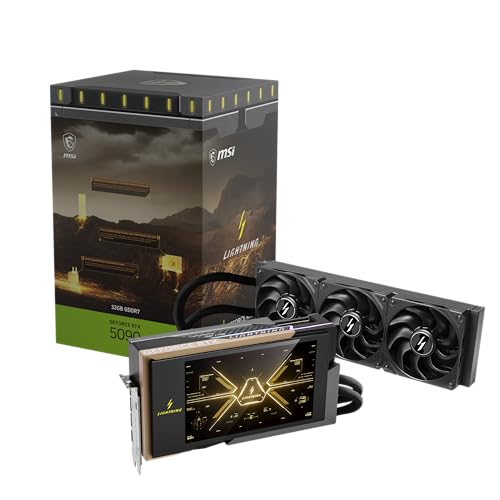
Cards like the MSI Gaming RTX 5090 32G Lightning Z Graphics Card and the ASUS ROG Astral NVIDIA GeForce RTX 5090 32GB GDDR7 White OC Edition Gaming Graphics Card offer 32GB of memory. While 32GB is plenty for a 70B model at 4-bit quantization, 2026’s SOTA models are pushing well past these limits. To get true performance, engineers are now building multi-GPU arrays, linking three or four of these cards together.
The advantage here is "burstiness." For interactive applications—like local RAG (Retrieval-Augmented Generation) or real-time coding assistants—the low latency of GDDR7 is hard to beat. However, once you scale to multiple cards, you face the PCIe bottleneck. Unless you’re using a high-end platform like the NOVATECH Apex WS9985X AI Workstation & Gaming PC, you’ll likely see diminishing returns due to inter-GPU communication overhead.
§HBM3e: The massive parameter king
On the other side of the fence sits High Bandwidth Memory (HBM3e). This isn't just "faster RAM"; it's a radically different architecture that stacks dies vertically and sits right on the GPU interposer. In 2026, HBM3e is what powers the heavy hitters like the ASUS Dual AMD EPYC 9004 Series 4U GPU Server (ESC8000A-E12P) with 2x NVIDIA H200 NVL 141GB GPUs.
Why would a local engineer spend $70k+ on an HBM3e system?
- Capacity: 141GB per GPU (on the H200 NVL) allows you to run even the most massive 400B+ models in high-bit depth (FP8 or even FP16) without splitting weights across cards.
- Context Window: Long-context models (1M+ tokens) eat VRAM for breakfast. HBM3e’s massive capacity allows for deeper KV caches.
- Efficiency: It provides more bandwidth-per-watt than GDDR7, which matters when your workstation is pulling power from a standard 15A or 20A circuit.
§Comparing architectures for local ML
When deciding between these two, you have to look at your specific workload. Are you fine-tuning 7B models, or are you trying to run an unquantized Llama-4 405B (or whatever 2026's equivalent is) locally?
| Feature | Multi-GDDR7 Array (RTX 5090) | Enterprise HBM3e (H200 NVL) |
|---|---|---|
| Typical VRAM per Unit | 32GB | 141GB |
| Bandwidth | ~1.5 - 1.8 TB/s | ~4.8 TB/s |
| Scaling | Diminishing returns after 4 GPUs | Linear scaling via NVLink/NVSwitch |
| Local Stability | High (Consumer Cooling) | Requires Server Grade / 4U Rack |
| Price per GB VRAM | ~$190 / GB | ~$550 / GB |
§The middle ground: Blackwell Workstation GPUs
Many engineers are finding the "sweet spot" isn’t in consumer cards or $80k servers, but in specialized workstations. The BoxGPT AI Workstation, RTX PRO 6000 Blackwell utilizes the PNY Technology VCNRTXPRO6000BQ-PB NVIDIA RTX PRO 6000 Blackwell Max-Q, which offers a massive 96GB of VRAM.
While it sticks to GDDR-based variants (optimized for Max-Q efficiency), the density allows you to avoid the complexity of HBM3e while still fitting massive transformer blocks. For those who need to maintain local quietude, cards like the GIGABYTE AORUS GeForce RTX 5090 Stealth ICE 32G are excellent for smaller dev environments, but they can't touch the raw density of a Pro 6000 setup.
§Why memory bandwidth matters for inference
Inference is fundamentally a memory-bound task. During the "prefill" stage (processing your prompt), the GPU's compute units are the stars. But during the "decoding" stage (generating tokens one by one), the bottleneck is how fast the weight of each layer can be moved from VRAM to the processing cores.
If you’re running a model at 4-bit precision on a PNY VCNRTXA6000-PB NVIDIA 48GB GDDR6 Graphics Card, you're using older tech that, while stable, will feel noticeably "laggy" compared to a GDDR7-equipped MSI Gaming RTX 5090 32G Lightning Z Graphics Card. GDDR7 provides a roughly 30-50% uplift in raw memory throughput depending on the clock speeds, making it the definitive choice for real-time inference on models under 100B params.
How to choose your path
- The Prosumer/Dev: Aim for a dual or quad RTX 5090 setup. It's the most cost-effective way to hit 64GB-128GB of VRAM with top-tier speeds.
- The Researcher: Spend the extra on a PNY Technology VCNRTXPRO6000BQ-PB NVIDIA RTX PRO 6000 Blackwell Max-Q. The 96GB buffer is the minimum for serious development in 2026.
- The Enterprise Lab: Only HBM3e will do. Systems like the ASUS Dual AMD EPYC 9004 Series 4U GPU Server represent the "buy once, cry once" philosophy that ensures you can run anything the AI community releases for the next 24 months.
Check out our full analysis of AI GPUs and AI Workstations to see more head-to-head benchmarks.
FAQ
Can I mix GDDR7 and HBM3e GPUs in the same workstation?
Technically, yes, but it’s a nightmare for optimization. Most inference engines like vLLM or Ollama will default to the slowest common denominator or struggle with load balancing. It’s better to stick to a uniform memory architecture within a single node to avoid massive latency spikes.
Is the RTX 5090's 32GB enough for 2026's SOTA models?
For 70B models at 4-bit, it's perfect. For the larger 400B+ models, you'll need at least three 5090s or a shift to a 96GB card like the RTX PRO 6000 Blackwell.
How does GDDR7 heat compare to HBM3e for local offices?
GDDR7 runs hot—very hot. Cards like the ASUS ROG Astral RTX 5090 require serious airflow and space. HBM3e is actually more power-efficient per gigabit of throughput, but the chips it’s attached to (like the H200) are designed for server rooms and are incredibly loud.
§Verdict
If your priority is inference speed for interactive tools, go with a multi-GPU GDDR7 array. The value proposition of the MSI Gaming RTX 5090 32G Lightning Z is unbeatable for local developers. However, if your priority is model fidelity and context length, you cannot escape the need for HBM3e. Investing in an enterprise system like the ASUS ESC8000A-E12P is the only way to ensure you aren't just running "skinny" versions of the world's best models.
Heads up: AI Hardware Hub may earn a commission when you buy through links on this page. We only recommend gear we'd run ourselves.