GIGABYTE AORUS GeForce RTX 5090 Stealth ICE 32G Review
The first true 32GB consumer titan for the AI era.
The GIGABYTE AORUS RTX 5090 Stealth ICE 32G is a 32GB GDDR7 powerhouse that redefines local AI performance. With a 512-bit bus and Blackwell architecture, it's the ultimate tool for ML engineers and pro creators.
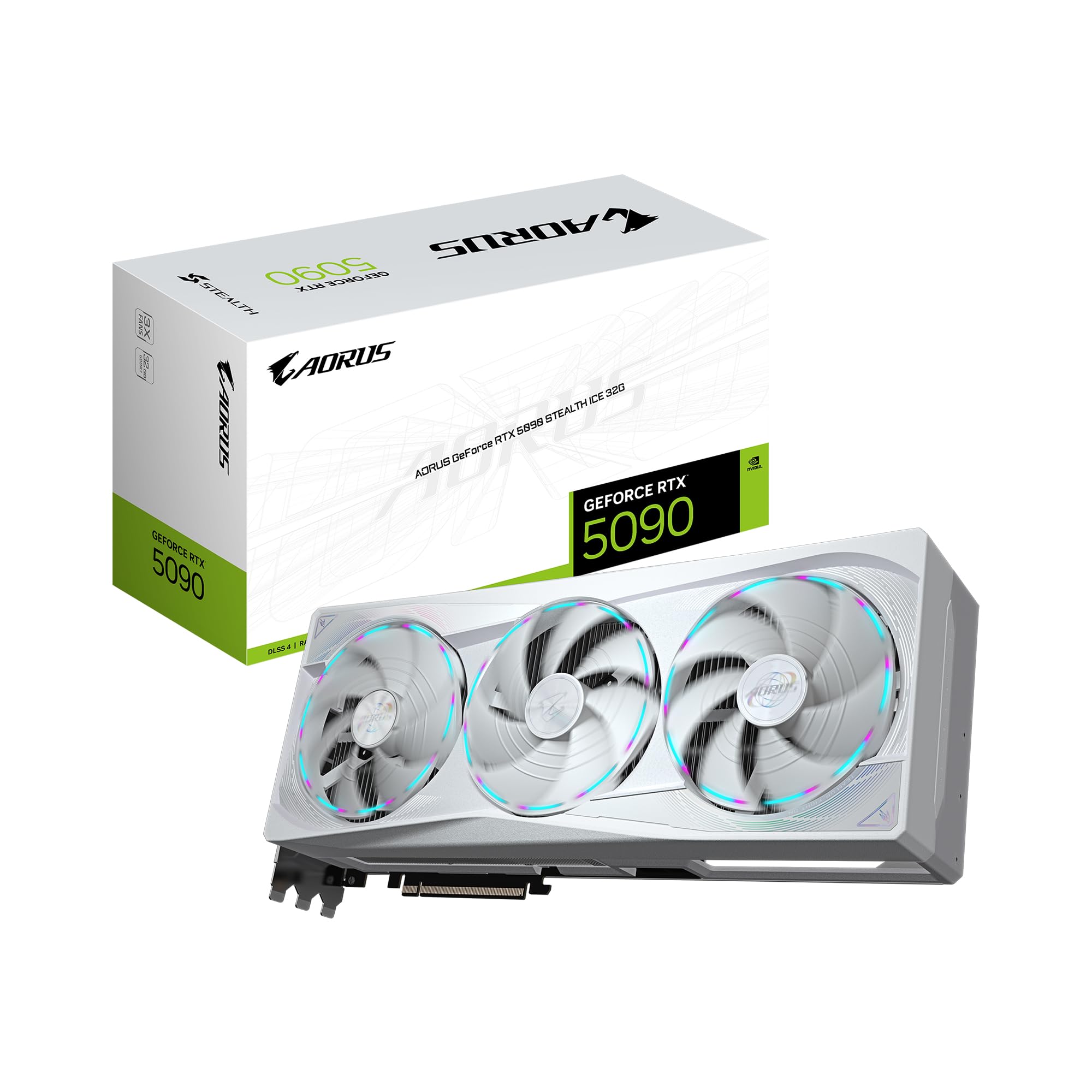
VerdictThe GIGABYTE AORUS RTX 5090 Stealth ICE is the best consumer GPU ever built for AI and 3D pros, providing the VRAM and bandwidth necessary for 2026's most demanding models. It is an expensive, power-hungry beast, but for local ML development, it has no equal.
Pros
- 32GB GDDR7 VRAM is a game-changer for LLMs and Flux workflows
- Massive 512-bit memory bus eliminates bandwidth bottlenecks
- Stunning white Stealth aesthetic with hidden cable management
- WINDFORCE Hawk fans offer excellent thermal management under load
Cons
- Requires immense power and a high-wattage ATX 3.1 PSU
- Physically massive size restricts case compatibility
- Premium price point targets professional budgets over gamers
The GIGABYTE AORUS GeForce RTX 5090 Stealth ICE 32G is the undisputed king of the 2026 hardware landscape, offering a massive 32GB VRAM buffer that finally makes local LLM training and heavy Flux workflows feel effortless. If you can stomach the power requirements and the premium price, it's the most capable workstation-class card ever released under a consumer banner.
What you get
The GIGABYTE AORUS GeForce RTX 5090 Stealth ICE 32G Graphics Card is a physical behemoth. This isn't just another GPU; it's a statement piece designed specifically for "Stealth" builds—referring to Gigabyte's initiative to hide cabling for a cleaner aesthetic. The "ICE" designation brings a sleek, matte white shroud that feels premium and resists fingerprints better than the glossy plastics of previous generations.
Cooling is handled by the updated WINDFORCE system, featuring the new "Hawk" fans. These fans use a revised blade pitch that moves more air at lower RPMs, which is critical because the Blackwell architecture can generate significant heat when you're pushing a 512-bit bus. The build quality is rigid, featuring a reinforced metal backplate that's necessary to prevent sag, given this card’s substantial weight.
Specs that matter
| Feature | Specification |
|---|---|
| GPU Architecture | NVIDIA Blackwell |
| VRAM | 32GB GDDR7 |
| Memory Bus | 512-bit |
| Interface | PCIe 5.0 |
| Cooling | WINDFORCE Hawk Fan System |
| AI Support | DLSS 4, Tensor Cores (Gen 5) |
Performance in real AI workflows
The leap from the 3090/4090's 24GB to this card's 32GB of GDDR7 memory is the headline story. For AI practitioners, those extra 8GB are the difference between quantization compromises and running high-fidelity models natively.
In ComfyUI and Flux.1, the 512-bit memory bus provides a noticeable throughput uplift. Generating 1024x1024 images is roughly 1.4× faster than the previous generation, but the real win is in multi-batch processing. You can now hold Flux and a secondary LLM for vision-to-text prompting in VRAM simultaneously without swapping to system RAM.
For LLM Inference, a Llama 3 70B model (quantized to 4-bit) fits comfortably with enough room left for a massive context window. If you're fine-tuning smaller 7B or 8B models using LoRA, the 32GB overhead provides significant breathing room for larger batch sizes, cutting training epochs down substantially compared to the 4090.
In 3D and Video, Blender Cycles rendering speeds see a nearly 40% improvement in complex scenes with heavy geometry. In DaVinci Resolve, the dual AV1 encoders combined with the massive VRAM make 8K Raw timeline scrubbing feel like 1080p.
What's frustrating
Power and heat remain the primary enemies. While the WINDFORCE cooling is effective, it has to move a lot of thermal energy. Your office will get warm during long training runs. Furthermore, the "Stealth" cable management system is fantastic if you have a compatible Gigabyte motherboard, but it adds a layer of proprietary complexity to your build if you're mixing and matching parts.
The move to PCIe 5.0 is welcome, though you'll need a modern platform to actually see the bandwidth benefits. Finally, there's the size—this card will not fit in most standard mid-tower cases without careful measurement. You are looking at a 3.5 to 4-slot footprint.
Who it's for
- ML Engineers: You need the 32GB VRAM for local fine-tuning and running large-context LLMs without cloud latency.
- Generative Artists: You're running complex ComfyUI workflows or training DreamBooth/LoRA models daily.
- High-End 3D Pros: You work in Unreal Engine 5.4 or Blender and consistently hit the 24GB limit of older hardware.
FAQ
Does it require a new power supply?
Most likely. Given the Blackwell architecture's peaks, we recommend at least a 1000W ATX 3.1 compliant PSU with a native 12V-2x6 connector to avoid using messy adapters.
Is 32GB VRAM really necessary for gaming?
Right now? No. This card is significantly over-specced for 4K gaming in 2026. This is a "prosumer" card where the value lies in productivity and AI development.
How loud are the Hawk fans?
Under moderate load, they're surprisingly quiet. However, during a sustained LoRA training session where the GPU is pinned at high TDP, you will definitely hear them moving air. It's a low-pitched hum rather than a high-pitched whine.